

POET Quote to Order Demo
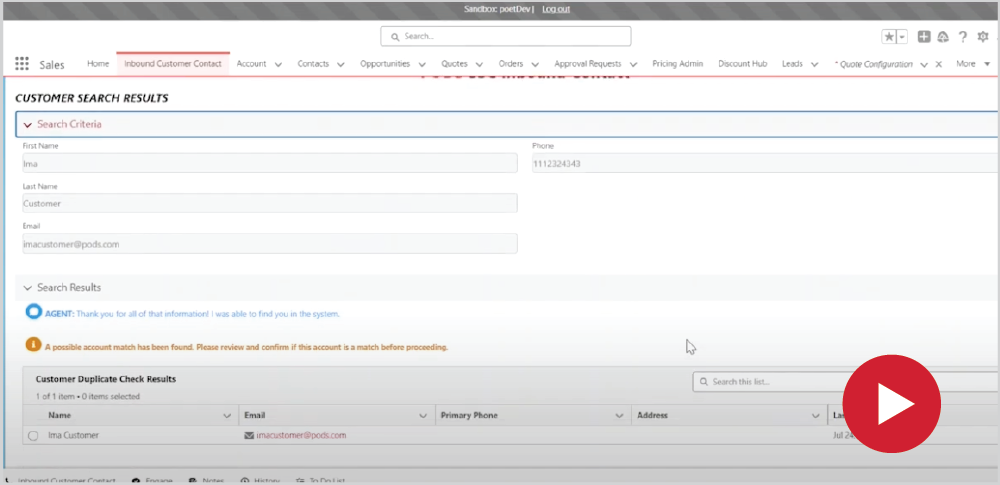
“Ima Customer calls back in and she is ready to convert her quote to an order. So I'm going to go in and search for Ima customer, her email, Imacustomer@PODS.com and her phone number that's automatically populated through the IVR. We don't have to put in any other information, so we will just hit next and search for her customer account,” said Hannah Eibner.
“As we know, there is a possible match and you can see that her email matches. So we will then hit next. We don't have to make any updates to her existing account, so we will just click Update Existing account, which will lead us at her account page.”
“She is ready to convert her order that only had two 16ft containers on there. And so we can go and we can remind her of all of the charges, and then we will hit convert quote to order.”
“So as we go through converting a quoted order, there's a couple different pages. There is the customer information, the placement permit drivers notes, any forms that will be required, payment details and reviewing the order details. The first one is a required disclosure.”
“So once you read that to the customer you can market is yes. Then we have the military move. If we tap on this, that an additional disclosure and a weight check, your required fuel become available.”
“But in this case it is not a military move. And so we will just reconfirm that we want to use the primary email on file. If not, then you can see an additional field becomes available to send the confirmation email.”
“And same thing with the phone number. So if we would like to add a new phone number for the driver to call, you just said no. And what type of phone number and the phone number provided by the customer for that driver to use when they want to call the customer.”
“Then lastly, we just want to confirm the billing address. So we are going to have the billing address be the same as what their origin is. And then you can additionally add alternate contacts.”
“So if you are we can add Aviva customer. This phone number is 1112325454, and her email. And then we will hit next.”
“From there we will have to deal with the placement permit and drivers notes for each of the addresses. We will add the delivery details for that first address. And we can see that there are no guidelines or limitations or other information we need to review with the customer, So we'll just say yes.”
“And same thing with the permits and regulations, any permits or regulations, And all that information will be available. And once you review with the customer you will mark it as yes. Then to assist the driver, we have a little bit of information that we need to provide.”
“So in this case the first major intersection it's main and third is the second one. This is not in a complex, So there's no complex name and it is not in a gated community. If it was, then there would be an optional field for a gate code and the directions for entry.”
“Then for each of the containers, we will have to do a couple of important fields. So they're placement action for asphalt in this case. Both of these containers will be placed on cement for asphalt.”
“If this was no, an additional alert for unpaved services would appear. And that additional form would show in the forms page, that both of these are going to be on the driveway and one is going to be to the left of the building, and one is going to be to the right of the building.”
“And then for both of these, we want the orientation to be rear facing, the additional drivers notes field is just if there's any information that the customer wants to provide, we can put that there. And then we'll say the address information. We'll do the same thing.”
“For the zip code, considering they haven't added a full address, then we don't need to do all of the drivers notes. But we still need to review any placement and permit and regulations. So we'll acknowledge that we've gone through these with the customer once we have, and we'll save that information.”
“You will Then later on when the customer provides their final address going and update the drivers notes as an order modification. As you can see here, the only form that is required for this move is the rental agreement, which you need to go to my Pod Satcom to complete. In the case that they were moving from California to California, there would be bug forms.”
“If they were moving cross-border, then all of those would appear as well. Then you're just going to select your payment type and send them off with five nine, get the credit card information updated. And then this is your final review order details page, where you will read out the required disclosures.”
“Review the customer information that they've taken down. Review the total charges for the order. Review their payment information.”
“See that you've completed the driver's notes for both. And then there's a breakdown of each container and the rental agreements. Once you've reviewed all of that with the customer, you will then convert that quote to an order.”
“And you will see a page that lets you know that that quote has been booked as an order, and you'll have your final disclosure that you're going to transfer them to an automated disclosure line. You can read out their order number to them. And then from here you can go to their order and you will be on the order page.”
 TEST POPUP