

POET Account Search Demo
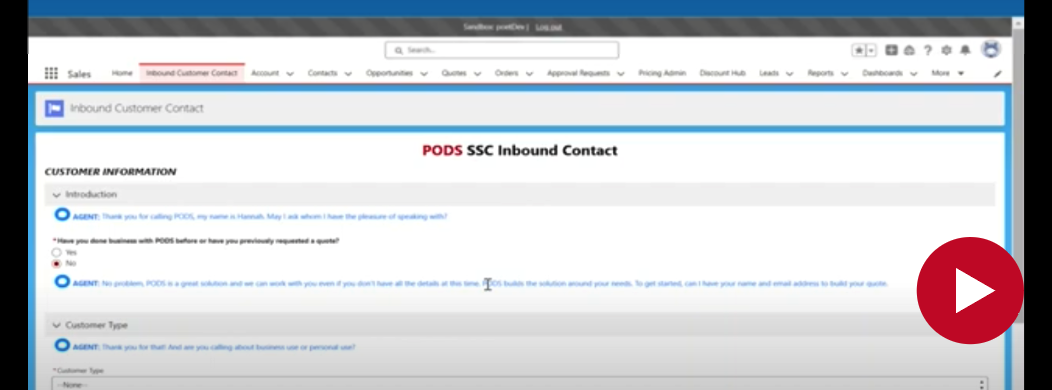
“As a part of Project Poet, searching for customers will get even easier in the future state! For customers who don't match on the IVR, you'll start from this inbound customer contact page, where you'll have agent scripting that will help you guide your conversation with the customer. This is customized to yourself so you can see your name will pop up in the agent scripting, where applicable,” said Hannah Eibner.
“The first thing you'll do is ask a customer if they've previously done business with PODS or requested a quote. If they have, additional fields that become available to search for the customer, including a customer number, a quote number, order number, case number or a container number. In the event a customer hasn't requested a quote, or previously done business with PODS, all that’s required to search is what the type of customer is; in this case, we're going to search for a residential customer and their email.”
“There is a workaround in case the customer does not want to provide their email to PODS this time, so I'm going to go in and search for John Smith. The phone number he's calling in on will be automatically populated with the integration with Five Nine. Once I put in his information, I’ll then hit next and it’ll search for any additional accounts that might match to John.”
“In this case you can see there's no results that match for John, which will then prompt you to manually search, in which case you could see if somebody else was calling in on behalf of John, before he called in. In this case that didn't happen, so we're going to create a new account for John. And you can see it's pulled over all of that information; his first name, last name, email, phone number, what type of phone number, and if we want to put in a secondary phone number.”
“It'll then also ask us if the customer wants to be opted-in to mobile messaging. And there's agent scripting of what you can say to that customer.”
“From here, we're going to hit next, and John's account is going to get created. And all of that information will be pulled over, and from here you can begin to build his quote.”
“In the case that a customer has done business with PODS before, we're going to search for a residential customer, whose name is Axel Foley. However, when I'm talking to Axel, I misspell his name, and I type it in as Alex. I've put in all of his information and I'm going to hit next, and it's going to search for Axel Foley.”
“At the top you can see we have all of the criteria that we put in initially, including his name, his email and his phone number so that we can go in and we can see all of these potential Axel Foleys or Alex Foleys that we have in here.”
“So I can look at his phone number and find the Axel Foley that matches. I'll then click on his account, hit next, and reconfirm some details about his account, including his phone in case we want to update it, a secondary phone, updating his email … Then I'll select mobile, update his existing account and end fully on his account page, where we can then create a quote for him or select one of his existing quotes!”
 TEST POPUP